In this article
Searching for “Utah CIS” often starts with a small task: find a class, understand a bill, or check whether a change worked. Campus Information Services is the University of Utah’s doorway to several services, not one record with one owner. That distinction explains why a class can appear in one place while a related financial or academic question remains unsettled elsewhere.
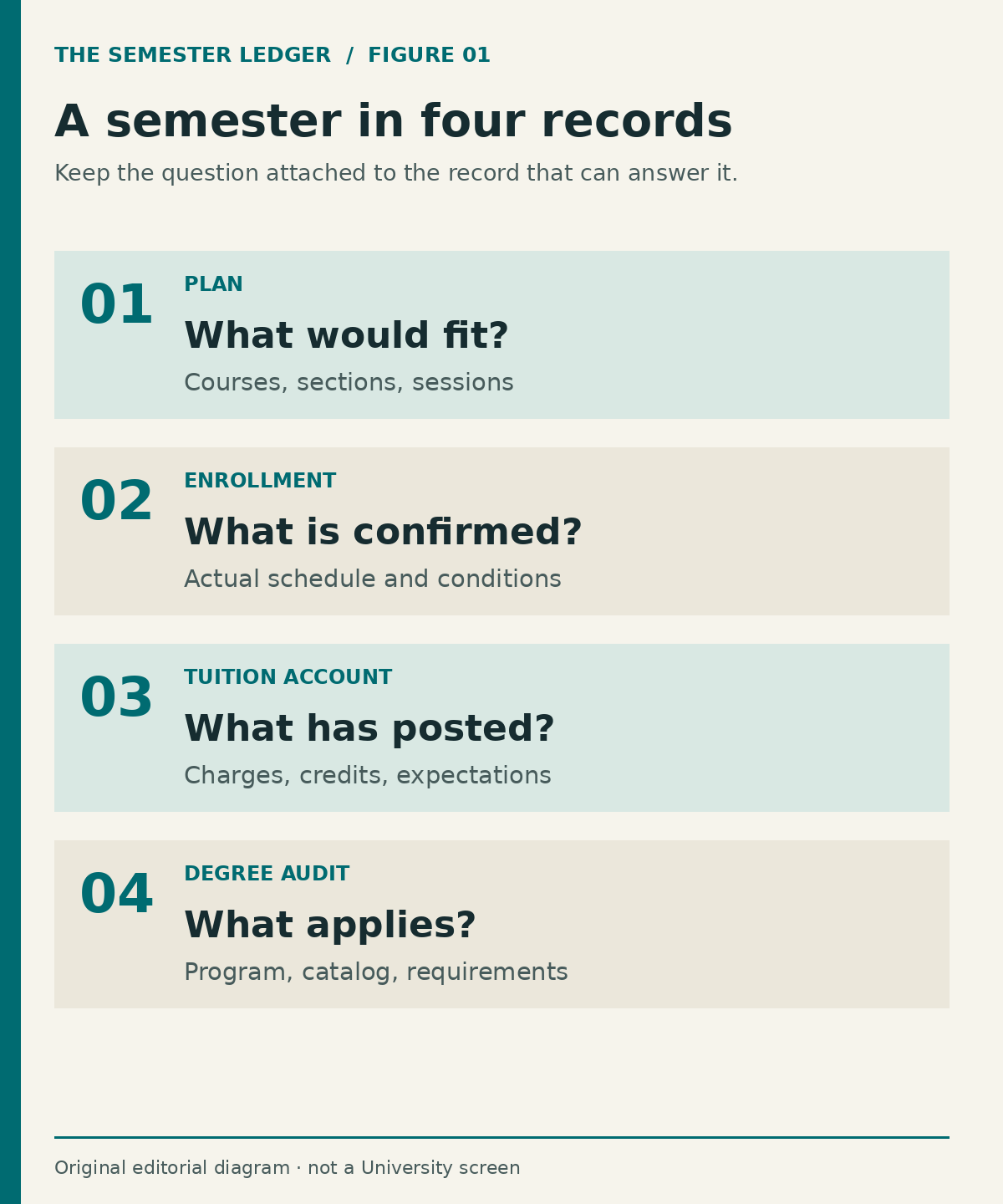
The useful habit is to follow a semester through its separate records. Begin with what you intend to take. Confirm what you actually enrolled in. Read the charges and credits that result. Then check how completed work applies to your academic plan. Each step answers a different question. This guide builds that map without asking for your login, student ID, financial documents or private academic record.
Official context: UIT online service quick links, UIT: New Student Guide to Digital Resources, Registrar: Fall 2026 Academic Calendar, Financial Aid: Disbursement of Funds, Registrar: Find the Right Help.
A portal is an entrance, not an answer
University Information Technology describes CIS as access to self-service university applications. Its student guide identifies areas such as classes, grades, financial services and graduation. Use the official University service directory when you need the real system. This publication is independent; it neither displays your account nor reproduces an authenticated screen. A familiar phrase on a search result does not turn that result into University support.
Before opening a service, finish this sentence privately: “I need to establish whether…” A precise ending might be “I am enrolled in section 003,” “the scholarship has posted to this term,” or “my declared minor appears in the audit.” Those questions point toward different evidence. “Fix CIS” does not. It describes the common doorway while leaving the actual problem unidentified.
The first record is an intention
A possible schedule is a proposal. Its class times may fit together beautifully while a prerequisite, hold, reserved seat or registration appointment still prevents enrollment. Think of a shopping cart as a draft itinerary. It gives you something to evaluate, but it is not proof that the institution has accepted each requested class. Keep the distinction visible when discussing your workload with an employer or planning a commute.
Create two private columns: planned and confirmed. In the planned column, note course, section, session, credits and any unresolved condition. Move a class to confirmed only after reviewing the enrollment result and your resulting schedule in the official system. Do not infer success from a button press, a cart count or a browser returning to its previous screen. The result of the transaction is the evidence that matters.
A semester contains more than one clock
Full-semester, first-half, second-half and miscellaneous-session classes can have different change deadlines. The Registrar’s Fall 2026 calendar separates these categories. For that reviewed calendar, the full-semester add/drop date is September 4, while second-half classes have an October 23 add/drop date. The calendar places deadlines in Mountain Time and warns that dates may change. These are examples from Fall 2026, not reusable deadlines for another term.
A student taking two sessions therefore needs two rows, even if both courses appear under the same semester heading. Put the action beside the date: add, drop, withdraw, or grading-option change. A date without its action is an incomplete instruction. If the course uses a miscellaneous session, consult its specific deadline information rather than calculating an unofficial deadline from a classmate’s schedule.
Enrollment and academic progress are separate checks
Enrollment establishes that a class is on your schedule. It does not by itself establish that the class satisfies the requirement you intended. A course can count as credit while fitting a different part of a degree audit, or it may need an advisor’s interpretation. The right question is not simply whether the course exists in the record; it is what requirement the current audit assigns to it.
For a fictional student, an elective may be academically worthwhile yet leave a major requirement untouched. That is not necessarily an error in registration. The student needs to compare the course choice with the intended requirement and the applicable program information. Before substituting another course, obtain the relevant academic guidance. A planning exercise cannot approve an exception or certify that a particular combination leads to graduation.
The bill is another record with another vocabulary
A tuition bill organizes charges and credits. An aid offer expresses a financial-aid decision subject to its conditions. A refund reflects a later stage of money moving out of an account with a credit. These words should not be collapsed into one statement such as “the money is there.” Identify the record, term and status first. A number shown in one stage does not prove the next stage has occurred.
The University’s financial-aid disbursement page tells students to check their tuition bill and describes aid passing to the tuition account when eligibility and enrollment conditions are met. For your own reading, create a simple distinction between expected and posted amounts. Never subtract an expectation from a bill and call the difference the official amount due. Ask the responsible office how the specific item is being treated and which deadline applies.
One change can create several follow-up questions
Suppose a fictional student replaces a four-credit course with a three-credit course. The registration question is whether the change completed. The academic question is whether the replacement meets the same need. The financial question is whether the credit change affects charges, aid or another award condition. The time-management question is whether the replacement’s session and meeting pattern actually fit the student’s week. None of those answers automatically follows from the others.
Use a change record with three short entries: before, requested, and observed after. In the first, describe the confirmed schedule. In the second, describe the intended change. In the third, record what the official system now shows. Add unresolved consequences separately. This prevents an intended outcome from quietly becoming your remembered outcome when several browser windows or office conversations are involved.
Match the question to the responsible office
The Registrar publishes routes for registration, graduation, transcripts and student systems. Financial Aid explains awards and disbursement; the Bursar handles tuition-account matters. UIT supports technology access. Your academic advisor helps interpret academic planning within the advisor’s role. These responsibilities can meet at one issue, but they are not interchangeable. A password reset will not adjudicate a tuition adjustment, and an academic recommendation will not prove a payment posted.
A useful first inquiry names the observed condition and asks who owns the unresolved decision. For example: “My schedule now shows the intended section, but I do not understand how its three credits apply to the requirement I discussed. Which academic office should review that?” This is an invented example, not a script that supplies a student’s private facts. Keep actual correspondence in the University’s appropriate channel and share only the information that office requests.
Make confirmations specific enough to close the loop
A generic response such as “processed” can be difficult to interpret when a request contains several parts. Compare it with the exact outcome you sought. Did the section change? Did the hold disappear? Did the audit update? Was the question merely forwarded? A receipt for a request is useful evidence of submission; it is not always evidence that the requested outcome has been approved or completed.
For your own notes, distinguish submitted, acknowledged, decided and reflected in the record. These are editorial labels for organizing work, not University system statuses. Keep the original wording whenever you record an actual status. If the response and the record appear inconsistent, ask a focused follow-up rather than resubmitting the same transaction repeatedly. Repetition can make the history harder to understand without resolving the underlying condition.
Keep a small private semester file
You do not need a sprawling archive. Keep the term, course identifiers, relevant official deadlines, questions sent, replies received and the current unresolved item. Avoid duplicating credentials, bank information or unnecessary student records. The purpose is continuity: when you return after a weekend, you should be able to tell what changed and what still requires attention without reconstructing every click.
Before retaining a screenshot, ask whether a written note would do. Screenshots can capture more than the issue, including unrelated academic or financial details. If an official office needs a document, follow its instructions and verified submission route. Do not upload it to an independent guide, paste it into public comments or send it to an unverified address merely because the page uses University terminology.
A manageable weekly reading order
Start with anything that has a near-term consequence. Review unresolved holds or registration outcomes, then upcoming course-specific deadlines, then tuition-account and aid questions, then longer-range academic planning. The order should change when the facts change. A graduation application issue might outrank next term’s exploratory schedule; a same-day class deadline might outrank a nonurgent billing clarification.
The endpoint is a short, accurate statement: what is confirmed, what remains conditional, which office owns the next answer, and when the next check matters. CIS becomes easier to use when every number, status and deadline has a named purpose. You are not trying to master every University system. You are building a reliable account of your own semester, one verified transition at a time.
Sources and editorial scope
Public University sources reviewed October 15, 2026. Procedures, dates and individual eligibility can change. The planning methods and hypothetical examples are original editorial analysis. No private account was accessed; this publication cannot decide academic, financial-aid or tuition outcomes.
- UIT online service quick links — CIS is a self-service entrance; no authenticated account inspected.
- UIT: New Student Guide to Digital Resources — CIS student service areas only; no initial-credential instructions reproduced.
- Registrar: Fall 2026 Academic Calendar — Only Fall 2026 examples; separate sessions, Mountain Time and change warning. Page heading says Fall 2026 despite stale search-title metadata.
- Financial Aid: Disbursement of Funds — Offer, eligibility, tuition-account credit and remaining balance distinctions; no individual payment promise.
- Registrar: Find the Right Help — Office responsibility and official contact routing.